
Membership Start
If your studio wants members to pay full price up front on whatever day they initially sign up, then have their billing cycle be set going forward (i.e. 1st of the month):
- Set Membership Billing Cycle Day within Membership Plan (Studio > Membership Plans > Click into or Create one) - in this case, “1st of the Month”
- Send/Share Membership Start Link that's customized “Future Date” selected and check the box that says “Charge full amount immediately up front, add to account funds” below.
NAVIGATE TO: Users > All Users > User Start Links button > New Member Plan Start
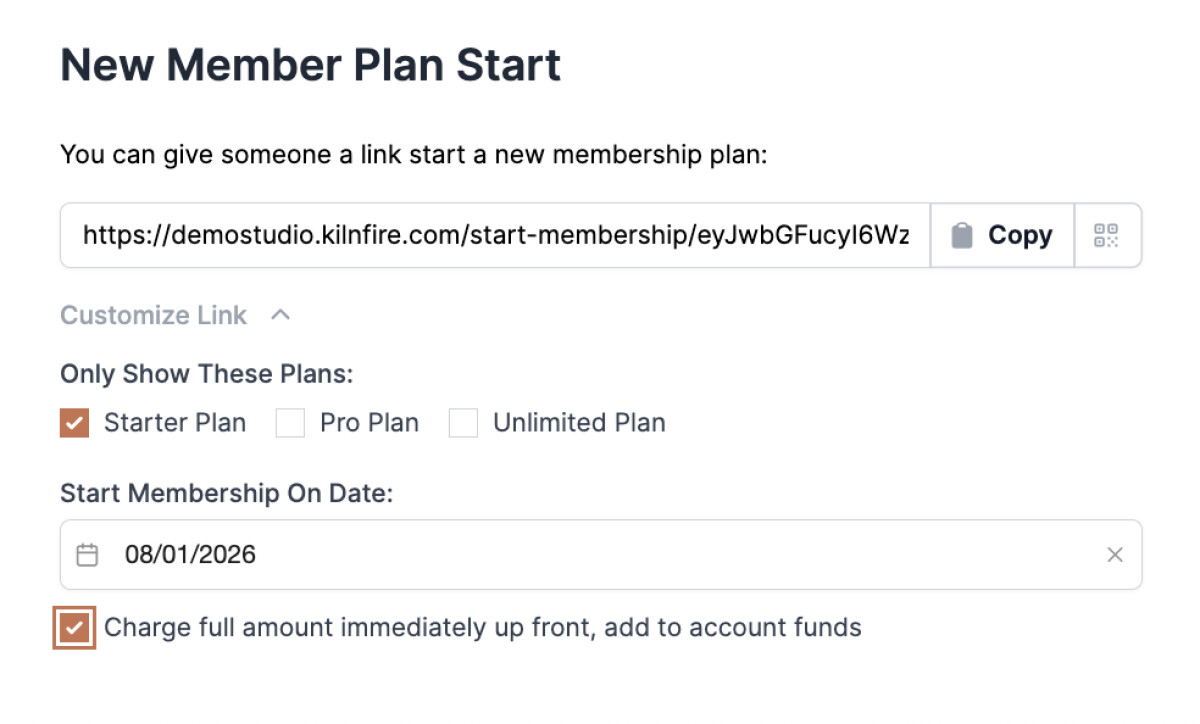
- This will charge them the full amount right away and "store" the value they paid in their Account Funds. When the set date comes around, Stripe will automatically take it from Account Funds first before charging any card on file for following months.
- If you end up needing to set the Start Membership date to something that's different than when Billing Cycle Day is set (i.e. the 15th instead of the 1st), it would automatically prorate for that time – removing roughly half of their stored Account Funds for that first month, then charge them a full membership fee on the 1st of the following month using the remaining Account Funds then charging whatever is left on credit card on file.
If your studio has Billing Cycle Day set to a certain date (like the 1st of the month) within Membership Plans and they sign up via a New Member Start Link that doesn't have a future start date (aka they are starting today), Stripe will automatically prorate the amount (aka subtract the x amount of days that have already passed for that month) then charge full amount on the next billing cycle date.
Membership Plan Change
If one of your members wants to change to a different membership plan:
- Go to that User's Profile (Users > All Users > Search by name and click into their profile)
- Scroll down and click “Edit Membership” button
- Select new membership they want to switch to, then “Review Membership Change” button
- Select “Immediately” or set a “Custom Date” (if changing in the future)
- Choose if you want to prorate now or not at all
- If member is choosing a membership plan that is a higher amount each month, Prorating here will automatically charge the card on file for the difference in price
- If member is choosing a membership that is a lower amount each month, Prorating here will automatically add the difference to Account Funds for their next membership charge
Note: whether or not the member themselves or a studio manager has to do these steps depends on the settings you have put in place under Studio > Membership Plans > Memberships (i.e. toggle for “Members can switch plans” is toggled on or off).
Membership End Proration
Only Studio Managers have the option to end someone's membership early. Even if you allow members to cancel their own plan, it would always last through what they paid for (i.e. end of that billing period).
Before billing date:
If a Studio Manager needs to end someone's membership immediately before a billing date of the next cycle, go to the user's profile, click “Edit Membership” button, select “Cancel Membership" – then you'll have the option to select “Immediately” and can set the date to be the last date before billing date (i.e. if you bill on the 1st of the month, set this date to the last day of the month).
After billing date:
Typically, if someone wants to cancel after that billing cycle's date already occurred, studios will “Cancel Membership” and select “At Period End”, and the date shown should be the end of that month's billing cycle. If there's a scenario where you need to “back date” it, you can do so by selecting “On Custom Date”. Account Funds will be added if needed, and you can always choose to refund those as well.