
Wheels, Handbuilding Stations, or Table Reservations
This is the main calendar view to see and easily add/edit reservations for your studio. Depending on how you set up your Reservable Items, you'd see each "station" and times listed. You can view by "Day", "Week", or "Month" using drop-down at the top, similar to a Google Calendar or something similar you've likely used before.
In the upper right, you have ways to search both individual users or stations as needed. You can also Export the data at any time.
Check In Page: Use this link for people with reservations to be able to check in for their time in-studio (also available on Check Ins feature).
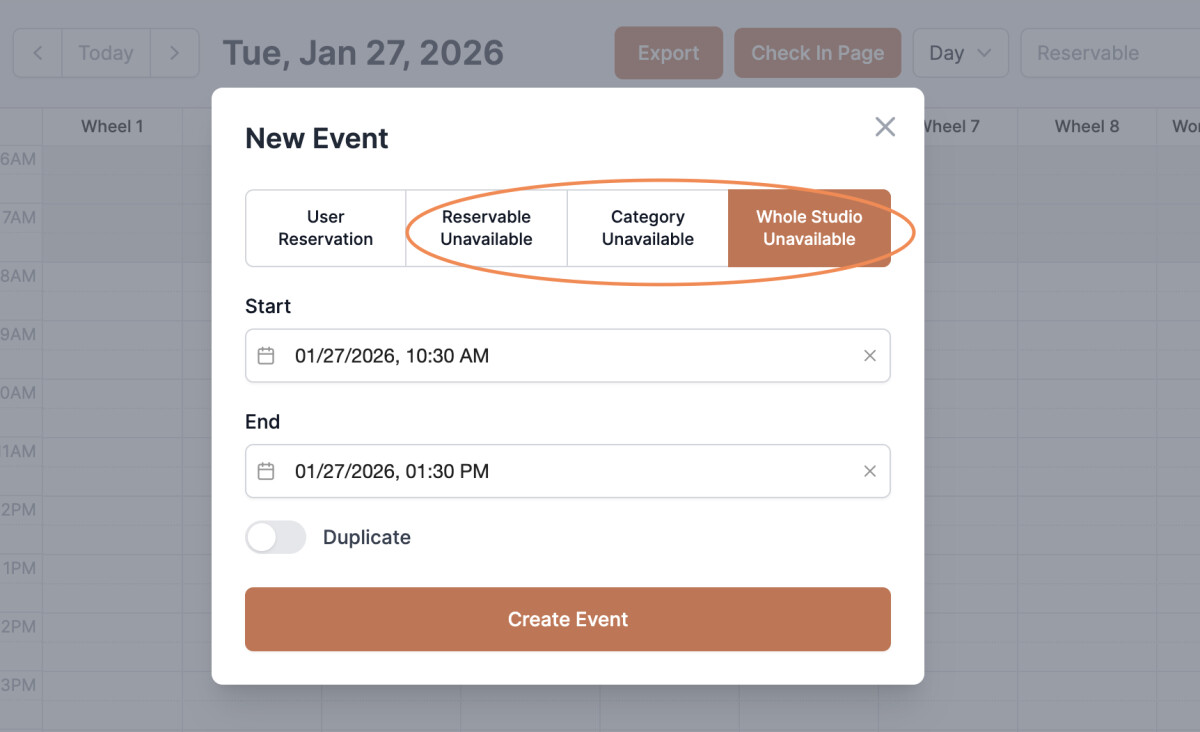
Studio Closed or Unavailable: If you need to block off certain areas or close up the studio for any reason, you can mark it as such here so none of your users are booking time during those times.
- Click and drag in the calendar view
- Reservable Unavailable: This is to block off a particular space/station
- Category Unavailable: This is to block off a whole space (i.e. Wheels)
- Whole Studio Unavailable: This blocks off entire studio from being available for reservations
NEW: Public Reservations
You can now accept reservations directly from the public—no Kiln Fire account required.
Public Reservations are great for PYOP table reservations, drop-in studio time, and other activities where you want customers to reserve a spot directly from your website.
You can collect basic contact information, let customers choose how many people are coming, and use our new Reservable Combinations feature to combine specific tables or other reservable items to accommodate larger groups. See Reservable Items page for more details on setting that up.
Perks and Payments
User Reservations made within the app can be paid for by user perks and/or a credit card on file. If a user's perk doesn't cover the whole reservation time, then the user would then have to pay the remaining hours that the perk doesn't cover.
Public reservations can be set to either be free, or have a price on them. These payments happen up front and charge the reserver's credit card.