
Through Stripe, Kiln Fire gives pottery studios the flexibility to accept and give a variety of payment methods, making it easier for customers to pay for memberships, classes, firing fees, and more.
Account Funds
Account Funds are an account balance that is held for a particular user in the Kiln Fire app. If a user has Account Funds, they are always used first before a credit card would be charged for things like membership fees, firing fees, class registrations, supplies, etc. In other words, Stripe would “take” from Account Funds before charing any card on file for a particular user.
Ways Users can receive Account Funds:
Manually:
- From a Gift Card - if a user receives a gift card from someone, they could add to their Account Funds and apply to class or something else in Kiln Fire.
- From a Studio Manager - sometimes a Studio Manager needs to and can give (or take away) users' Account Funds to spend at your studio. Some studios utilize this to compensate volunteers, make up for a mistaken charge, etc. Note: can sometimes complicate bookkeeping, so make sure to check with your accountant!
NAVIGATE TO: Users > All Users > select user you want to give funds to > under Account Funds, select Add, Remove, or Modify - A user adding money themselves - users can log in and click Billing & Card to Add Funds into their Account Funds.
Automatically:
- Prorating a Change in Membership - if a member downgrades from a more expensive plan to a less expensive plan in the middle of their typical billing cycle, their membership will automatically calculate a prorated amount of dollars to "refund" into Account Funds.
- Future Membership - If a member signs up to join the studio at a future date, you can customize when you want the membership to start as well as have them pre-pay for their future membership. When you select pre-pay, their payment is collected immediately upon sign up and put into the user's Account Funds but isn't “used” until membership officially starts. When it comes time for the membership to begin, the first month will be paid for out of those Account Funds.
- Firing Fee marked with firing issue - If a firing issue was marked by a staff member after the firing fee was already collected for a submitted piece, the staff member can "issue a credit" back for the price of that fee. Rather than a refund, this would go back to the use as a credit to their Account Funds.
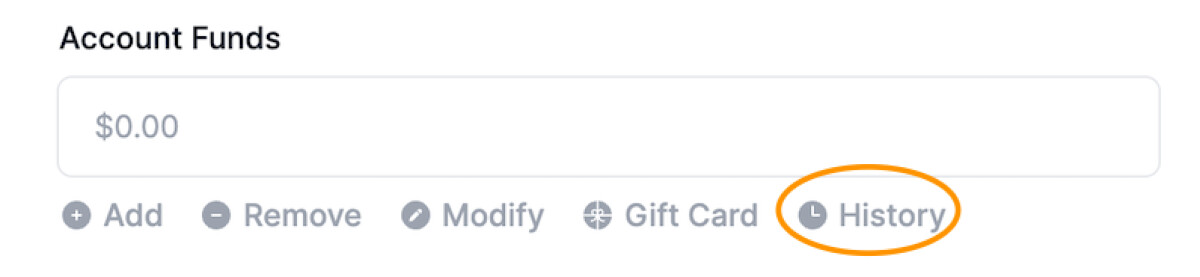
You can always view the history of someone's Account Funds, too, by going to their user profile, scrolling down to Account Funds, and selecting “History”:
Payment Methods
Kiln Fire can now accommodate multiple payment methods for transactions (class registration, supply purchases, etc.) By default, credit card payments are enabled and recommended for the most consistent experience. You can add (or remove) payment method options at any time.
NAVIGATE TO: Studio > Payment Methods
Step 1: Enable Your Payment Method Domain
The first thing every studio should consider enabling is their Payment Method Domain.
Enabling your domain allows customers to use:
Apple Pay
Google Pay
Klarna
How Apple Pay and Google Pay Work
These are not separate payment types — they are digital wallets. Apple Pay and Google Pay securely store your customer’s real credit or debit cards. When a customer pays:
- They don’t need to type their card number
- They can simply tap a button
- Their saved card is securely used
Benefits:
- Faster checkout
- Higher conversion rates
- More convenient for customers
- Same payout speed as normal credit cards
- Same protection as card payments
- From your studio’s perspective, these behave exactly like normal card payments.
Step 2: Configure Payment Methods Per Area
Kiln Fire allows different payment methods depending on what the customer is paying for.
This gives studios control over which payment types make sense in different situations.
Payment method settings can be configured for:
- Saved Card (Memberships, Supplies, Firing Fees, etc)
- Classes
- Piece Pickups
- Supplies (Public Cart)
- Private Events
- Invoices
Each of these areas may allow different payment methods depending on your studio’s preferences.
Available Payment Methods
Available payment methods depend on:
- Your Stripe account configuration
- Your country
- Your customer’s country
- Your bank
- Your Stripe eligibility
Not all methods will be available to all studios.
Card Payments (Recommended Default)
Card payments include:
- Credit cards
- Debit cards
- Apple Pay
- Google Pay
- Link (when used with cards)
This is the fastest, most reliable payment method.
Benefits
- Immediate payment confirmation
- Immediate access granted to customer
- Lowest risk of failure
- Works everywhere in Kiln Fire
Link (Stripe)
Link is Stripe’s accelerated checkout system.
Customers can save their payment details with Stripe and reuse them across many websites.
How it works
- Customer enters their information once
- Stripe securely saves it
- Future payments can be completed instantly
Benefits
- Faster checkout
- Higher conversion rates
- Same reliability as card payments
- Link uses card or bank payments behind the scenes.
Amazon Pay
Amazon Pay allows customers to pay using their Amazon account.
How it works
- Customer logs into Amazon
- Uses their saved payment methods
Benefits
- Trusted checkout experience
- Faster checkout
- No need to enter card details
- Availability varies by country and Stripe configuration.
ACH Direct Debit (US Only)
ACH allows customers to pay directly from their bank account.
Important: ACH payments are delayed
ACH payments typically take: 2–5 business days to complete
Because of this delay, ACH is only allowed for:
- Private Events
- Invoices
ACH is not allowed for:
- Classes
- Memberships
- Supplies
- Firing Fees
- Piece pickups
Why ACH is restricted
Because the payment is not immediate:
- The payment can fail days later
- Customers may assume they have paid when they have not
- It can create confusion and class overbooking issues
ACH is best for large, planned payments like:
- Large private event payments
- Large invoices
Klarna (Buy Now, Pay Later)
Klarna allows customers to pay later in installments.
How it works
- Customer chooses Klarna
- Klarna pays the studio immediately
- Customer pays Klarna later
Benefits
- Studio receives payment immediately
- Customer can pay over time
- Increases accessibility for higher-priced purchases
Important Notes
- Klarna charges additional fees, typically 5.99% + 30¢ rather than the typical credit card fee of 2.9% + 30¢.
- Customer approval is required
Klarna is popular for:
- Classes
- Private events
- Larger purchases
European SEPA Direct Debit
Available for European studios.
Similar to ACH, but for Europe.
How it works
- Customer pays from bank account
- Payment takes several days to complete
Considerations
- Slower than card payments
- May fail after submission
- Best for planned purchases
- Availability depends on your Stripe account and country.
Canadian Pre-Authorized Debit
Available for Canadian studios.
Similar to ACH and SEPA.
How it works
- Payment comes directly from bank account
- Processing takes several days
Considerations
- Delayed confirmation
- May fail after submission
Recommended Payment Setup
For the best experience, Kiln Fire recommends:
Minimum Setup:
✔ Card Payments
✔ Payment Method Domain Enabled (Apple Pay & Google Pay)
Optional:
✔ Klarna (if you want Buy Now, Pay Later)
✔ ACH (for invoices and events only)
Kiln Fire supports many modern payment options to make checkout easier for your customers.
Additional payment methods can provide flexibility, but should be enabled carefully based on your studio’s needs.